Automated Screenshot Proof, Productivity Intelligence & Tamper-Proof Endpoint Control
Verified Proof of Work. Automated Productivity Reports.
Zero Unauthorized Removal.
Track active hours, capture periodic encrypted screenshots, and generate automated productivity scores across your engineering workforce. Protected by a hardened background agent that employees cannot terminate or uninstall without an authorized Management Password.
Lifetime Platform Access
Trusted by 500+ IT Companies and Remote Dev Shops to Track Over 300,000 Productive Hours Weekly








The Problem vs. AlignHub Solution
Generic Project Tools Leave IT Teams Disconnected
When tasks live separate from credentials, leave schedules, and uptime alerts, engineers stall. AlignHub solves fragmented workflows natively.
Generic Trackers & The Honor System
Spreadsheets & Group Chats
Employees quit the tracking app or kill processes in Task Manager.
Mouse jigglers and fake activity inflate manual time trackers.
PMs spend hours manually compiling weekly productivity reports.
Disconnected monitoring tools that add recurring costs and fragment workforce visibility.
The AlignHub Hardened Productivity Standard
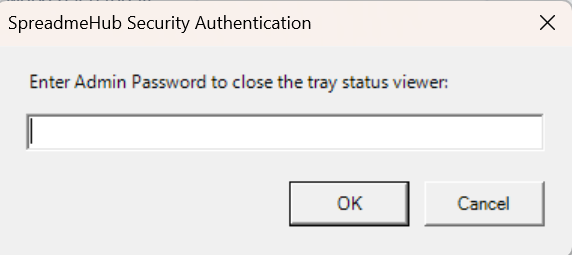
System service locked by a mandatory Management Uninstall Password.
Automated periodic screenshots and active app telemetry provide real proof.
Automated AI productivity digests generated and emailed to leadership daily.
Natively unified with Tasks, Credentials (Vault), Leave, and Hardware Assets.
Monitor Work. Protect Data. Improve Productivity.
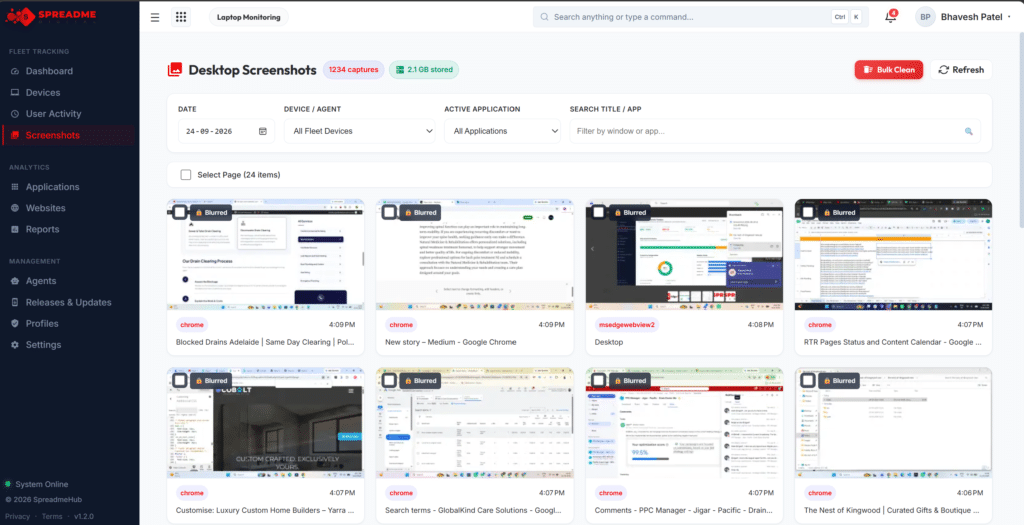
Encrypted Screenshot Verification
Automated Screen Captures & Proof of Work
Productive vs. Unproductive Work
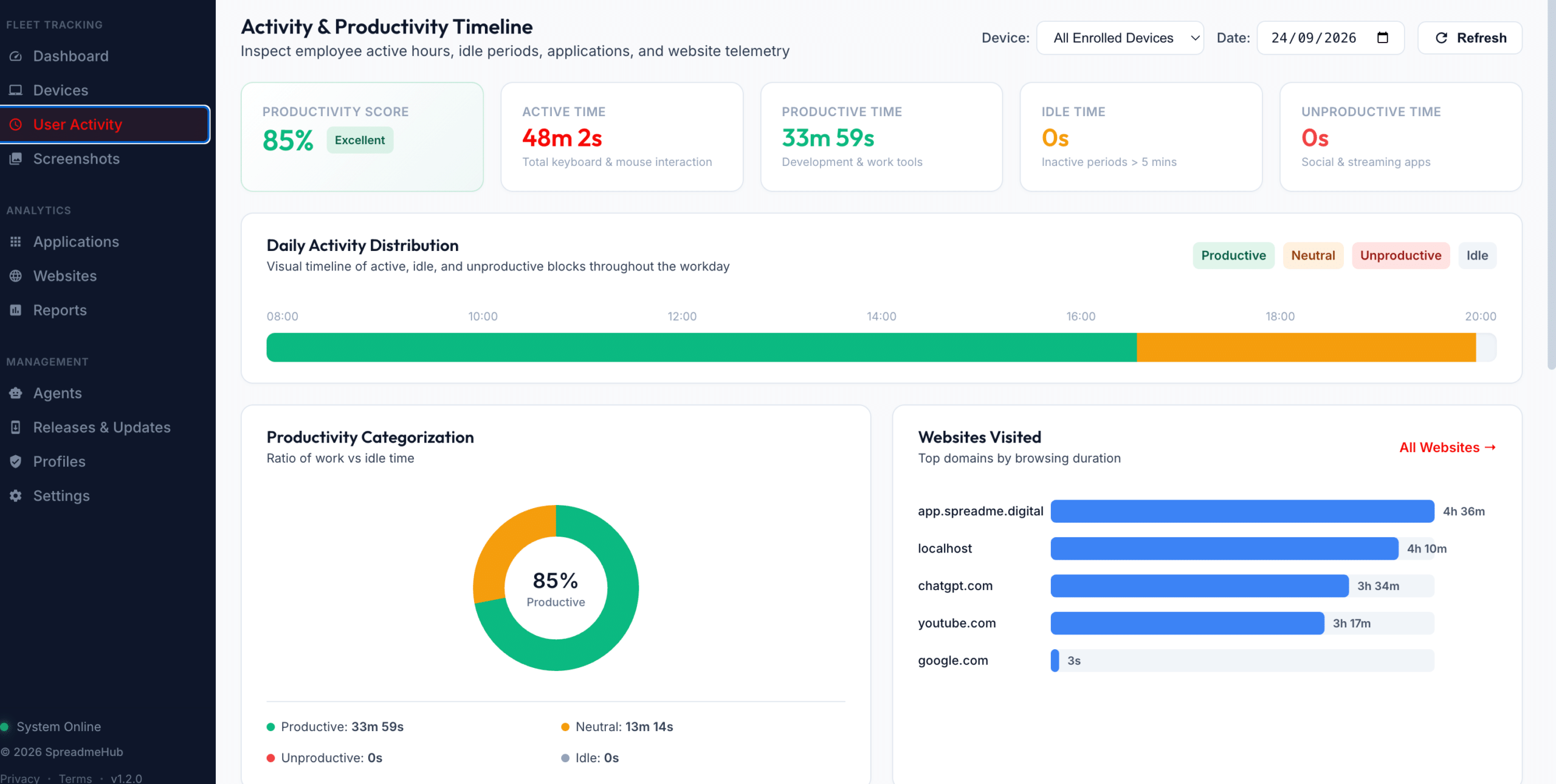
Deep Productivity Analytics & Categorization
Actionable Insights
Automated Daily & Weekly Executive Reports
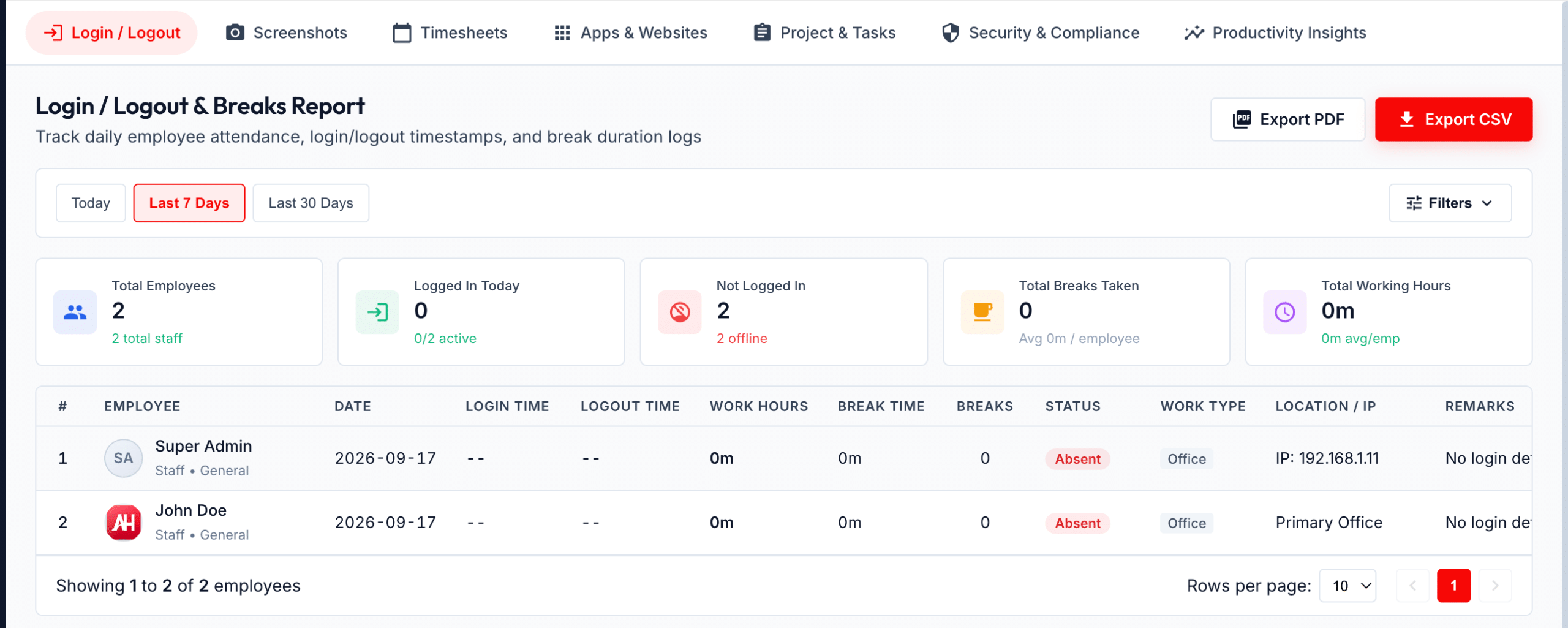
100% Agent Uptime
Hardened Management Password Lockdown
THE 5 MODULE ADVANTAGE
AlignHub's Unfair Advantage Over Standalone PMs
Unlike disconnected tools like Asana, ClickUp, and Trello, AlignHub tasks are natively unified with your entire operational ecosystem.
Management Uninstall Password
Enforce permanent workstation enforcement. Employees cannot terminate services, end tasks, or uninstall without master admin approval.
Intelligent Screenshot Privacy Blur
Comply with enterprise privacy guidelines. Enable automated blur filters on sensitive client passwords or personal browsing windows.
Active vs. Idle Time Detection
Distinguish genuine keystroke and mouse interaction from idle state. Detect mouse-jiggler hardware and auto-pause timers when inactive.
App & Website Usage Timelines
Track exact minute-by-minute software usage. See how much time developers spend in code editors vs. chat applications throughout the day.
Automated Client Proof-of-Work Logs
Eliminate billing disputes with enterprise clients. Export verified work logs with time-stamped screenshot evidence tied directly to client tasks.
Silent, Lightweight Performance
Built with low-overhead system drivers consuming under 1% CPU and negligible memory. Never slows down Docker, compilations, or IDEs.
THE 5 MODULE ADVANTAGE
THE 5-MODULE CONNECTED ECOSYSTEM ADVANTAGE
How Asset Management integrates with the other 4 modules to deliver a connected operations engine.
1. Task Management
Screenshots and active hours are mapped directly to project sprint tickets. Know exactly which client deliverable was on screen during every logged hour.
2. Asset Management
Telemetry maps to the assigned laptop's serial number. Identify hardware health issues, battery degradation, and ensure company machines remain productive.
3. Vault (Credentials)
If suspicious activity or an unauthorized system event is detected on a monitored laptop, admins can trigger an instant session lockout from all client vaults.
4. Leave Management
Monitoring auto-pauses during approved vacation or sick leave. Ensures work compliance is not penalized while team members are on authorized PTO.
Why Teams Choose Us
Why Settle for Five Tools When One Does It All?
Other tools hand you a box of parts and wish you luck. AlignHub comes with built-in asset tracking, secure credential vaults, and robust HR management software already connected, so you can stop stitching things together and actually run your agency.
CAPABILITY
AlignHub Monitoring
Hubstaf
Tamper-Proof Admin Password
Yes (Kernel Level)
No (Easily stopped)
Automated Periodic Screenshots
Yes (Encrypted + Blur)
Yes
Automated Productivity Reports
Included Daily/ Weekly
Basic Reports
Native Task & Sprint Sync
Native Sync
Requires integration
Credential Vault & Asset Sync
Native 5-Module CRM
No
Pricing Model
Included in Platform
+$7 to $12 /user/mo
CAPABILITY
AlignHub Monitoring
Time Doctor
Tamper-Proof Admin Password
Yes (Kernel Level)
No (User can quit)
Automated Periodic Screenshots
Yes (Encrypted + Blur)
Yes
Automated Productivity Reports
Included Daily/ Weekly
Included
Native Task & Sprint Sync
Native Sync
Requires integration
Native Task & Sprint Sync
Native 5-Module CRM
No
Pricing Model
Included in Platform
+$7 to $15 /user/ mo
CAPABILITY
Align Hub
Teramind
Tamper-Proof Admin Password
Yes (Kernel Level)
Yes
Automated Periodic Screenshots
Yes (Encrypted + Blur)
Yes
Automated Productivity Reports
Included Daily/ Weekly
Complex BI Setup
Native Task & Sprint Sync
Native Sync
No
Credential Vault & Asset Sync
Native 5-Module CRM
No
Pricing Model
Included in Platform
+$15 to $25 /user/ mo
CAPABILITY
AlignHub Monitoring
Hubstaf
Time Doctor
Teramind
Tamper-Proof Admin Password
Yes (Kernel Level)
No (Easily stopped)
No (User can quit)
Yes
Automated Periodic Screenshots
Yes (Encrypted + Blur)
Yes
Yes
Yes
Automated Productivity Reports
Included Daily/ Weekly
Basic Reports
Included
Complex BI Setup
Native Task & Sprint Sync
Native Sync
Requires integration
Requires integration
No
Credential Vault & Asset Sync
Native 5-Module CRM
No
No
No
Pricing Model
Included in Platform
+$7 to $12 /user/mo
+$7 to $15 /user/ mo
+$15 to $25 /user/ mo
TARGET USE CASES
Engineered for High-Velocity IT Organizations
Whether running client retainers, agile software sprints, or multi-tenant server infrastructure.
Offshore Dev Centers & Remote Tech Teams
Maintain total transparency across remote engineering teams with automated proof of work, verifiable productivity scores, and tamper-proof agent enforcement.
Hourly Client Billing & Digital Agencies
Eliminate client disputes over billable hours. Provide transparent, screenshot-backed audit trails tied to project milestones and deliverables.
IT Consultancies & Managed Service Providers (MSPs)
Ensure workstations handling sensitive client data remain strictly dedicated to client deliverables with active USB and peripheral tracking.
Frequently Asked Questions
Have questions about our plans? We have answers.
Screenshot frequency is fully customizable by workspace administrators—typically set to 1, 2, or 3 random screen
captures per 10-minute block.
No. The AlignHub agent installs as a protected system service with kernel-level tamper guards. Any attempt to
terminate the process or uninstall triggers a mandatory Management Password prompt that only authorized company
admins can authorize.
Admins classify applications and websites as Productive, Neutral, or Unproductive. The system tracks active time
spent across these categories and compiles automated daily and weekly productivity percentages.
AlignHub provides smart privacy blur settings that automatically obscure text in designated sensitive windows,
protecting proprietary client information and employee personal data.
Yes. When a team member starts working on an AlignHub task, all captured screenshots and active telemetry are
automatically indexed and tagged to that specific ticket.
Real Proof of Work. Total Workstation Control.
Unify laptop monitoring, automated screenshots, credentials, tasks, leaves, and assets in one workspace.